Bot traffic is defined as any machine driven, non-human traffic that connects to your website or app. Often “bots” are associated with all things negative, as they tend to be irritating due to their irrelevance in terms of user engagement.
However, bots aren’t necessarily good or bad. It all depends on their purpose. Some bots are designed to be useful to users. Others can be rather malignant, such as the ones designed for data scraping, launching denial-of-service (DDoS) attacks, malware installation or other unauthorized web crawling.
What makes these bots such a nuisance is that they can mess with your website analytics and they typically generate click-fraud. A action which defrauds services like Google AdSense, Google Ad Manager, and the programmatic advertising world.
What Are The Different Types of Bot Traffic?
Bots make up over 40-45% of all website traffic. A machine is touching your site, instead of the desired human being. If that’s not bad enough, there are different types you need to watch out for — six different types to be specific:
1. Click bots Click bots are the key tool used by spammers. These bots are considered the greatest threat posed to web publishers, especially those following the pay-per-click (PPC) model for their advertisements.
2. Download bots Download bots are ban of true marketing data analytics., especially when it comes to your user engagement data. They generate fake download count. If you are offering free products or services via a form, these bots will mess up your conversion rate data.
3. Spam bots The most common of all bots. These bots like mess with you website, by attempting to place ads in your comment fields, steal emails, and attempt to do website redirects, This can generate all sorts of negative SEO against you and your competitors. It is the fake news of the bot world.
4. Spy Bots These bots only goal is to quietly steal information. They like to steal semi-personal information like email addresses from websites and other communicative channels, which makes them incredibly dangerous.
5. Scraper Bots Scraper bots are massively malicious. They’re created by third-party scrapers, usually hired by your very own competitors with the intention of stealing your content, product catalogs, and even prices. Only to be repurposed and published somewhere else — without your permission, of course.
6. Imposter Bots Impostor bots act like they’re authentic visitors to bypass any security measures you have in place. These bots are most responsible for the DDoS attacks, and they really like to install spyware on your site, or position themselves as fake search engines.
Bots are a never-ending nuisance that will eventually destroy your website if you don’t take the proper measures to spot and prevent them. Between the different types of bots you’ll have to deal with, and the fact that they’re only getting smarter, you could have a lot of work ahead of you.
CEO & Technical Director of Multimedia Designs, LLC, System Designer, Developer, Producer with 15+ years in the internet design and development space and 25+ years in the Software Development for the entertainment industry. Winner of the prestigious International Themed Entertainment Association award for interactive design. She holds a degree in Computer Engineering & Mathematics from California State University, Long Beach.
MultiMedia Designs, LLC Digital Design & Technology Company Office: +1.818.272.0819 Email: multimediadesignsllc@gmail.com
A site’s bounce rate is a key piece of information it tells you how well people are or not engaging with a webpage’s content or user experience. A major league tool, that most of the internet websites use to determine bounce rates is called Google Analytics .
The frustrating part about these raw numbers is that it also can be a deceiving piece of information. Why deceiving, because while analytics log an access to your site, you have to figure out who area real people and who are bots cruising the web. So how do you find out what is the true rate? Let’s define first what a bounce rate is.
WHAT IS A BOUNCE RATE?
Bounce rate is calculated when a human or bot, visits a single page on your website and does nothing on the page before leaving the same page. The goal of any site, is to interest a human into performing another action such as buying something, filling out a form, or clicking on a link.
WHAT IS BOT TRAFFIC?
Bot traffic is defined as any non-human traffic that connects to your website or app. Often “bots” are associated with all things negative, as they tend to be irritating due to their irrelevance in terms of user engagement.
However, bots aren’t necessarily good or bad. It all depends on their purpose. Some bots are designed to be useful to users. Others can be rather malignant, such as the ones designed for data scraping, launching denial-of-service (DDoS) attacks, malware installation or other unauthorized web crawling.
What makes these bots such a nuisance is that they can mess with your website analytics and they typically generate click-fraud. A action which defrauds services like Google AdSense, Google Ad Manager, and the programmatic advertising world.
What Is a Good Bounce Rate?
To define what a good bounce rate is, you need to understand the difference between a high bounce rate and a low bounce rate. A high bounce rate means that a visitor’s overall session duration is short; they visit a page on your site and leave. A low bounce rate means that visitors are spending time on a page and clicking on available links.
A high bounce rate means that a visitor’s overall session duration is short
A low bounce rate means that visitors are spending time on a page and clicking on available links.
Another way to think about this is to think about a site’s structure. Let’s consider an ecommerce site. The homepage might have the highest bounce rate out of any page, for instance, because you want your visitors to stay on landing pages where they can make a purchase, like a product page.
So, what is a good bounce rate?
If you have done the work of protecting against Bots hitting your site, a bounce rate of 60% to 70% is on the high side. Some work may be necessary to drop this, in the Uix, loading speed, hosting response or similar website performance issues.
Average bounce rates range in the 41% to 55%, where an optimal bounce rate would be in the 26% to 40% range.
These are general ranges of evaluation and highly dependent on the popularity your site has with the bots.
Bounce Rate vs. Exit Rate
When discussing bounce rates, another term that frequently comes up is the exit rate. The difference between a bounce rate and an exit rate is sometimes not well understood since the two are rather similar.
If the bounce rate is the number of single-engagement sessions a webpage has, the exit rate is the number of people departing a specific page, even if they didn’t originally land on it.
As an example: If a person lands on page 1 of your site and hits their browser’s back button to the referring page, that’s a bounce. But if they land on page 1, go to page 2, and then quit their browser or jump to another site, that’s considered an exit. Because they clicked to another page from page 1, that can not be considered a bounce. Neither can page 2 since that’s not the first page the person landed on.
In terms of analysis, a bounce may indicate a lack of interest in a site, but a high exit rate could indicate you’re having problems with conversion rate optimization (CRO).
How to Lower Bounce Rates
If you want to lower your bounce rate, you should consider what can negatively impact your bounce rate, including:
Slow page loading speed
Pop-ups over the primary page
Unnecessary plug-ins loading the page.
Poor usability via the Uix
Title tags and meta descriptions that aren’t properly optimized
Technical errors
Missing Pages
No SSL
Dull content
Pages that aren’t mobile or tablet friendly aka responsive.
Improperly implemented Google Analytics setup
WHAT ELSE CAN YOU DO?
Optimize for Mobile/Tablet There is a rising number of people using their smart phones as their primary internet viewing device. Having a good design, that is responsive is essential.
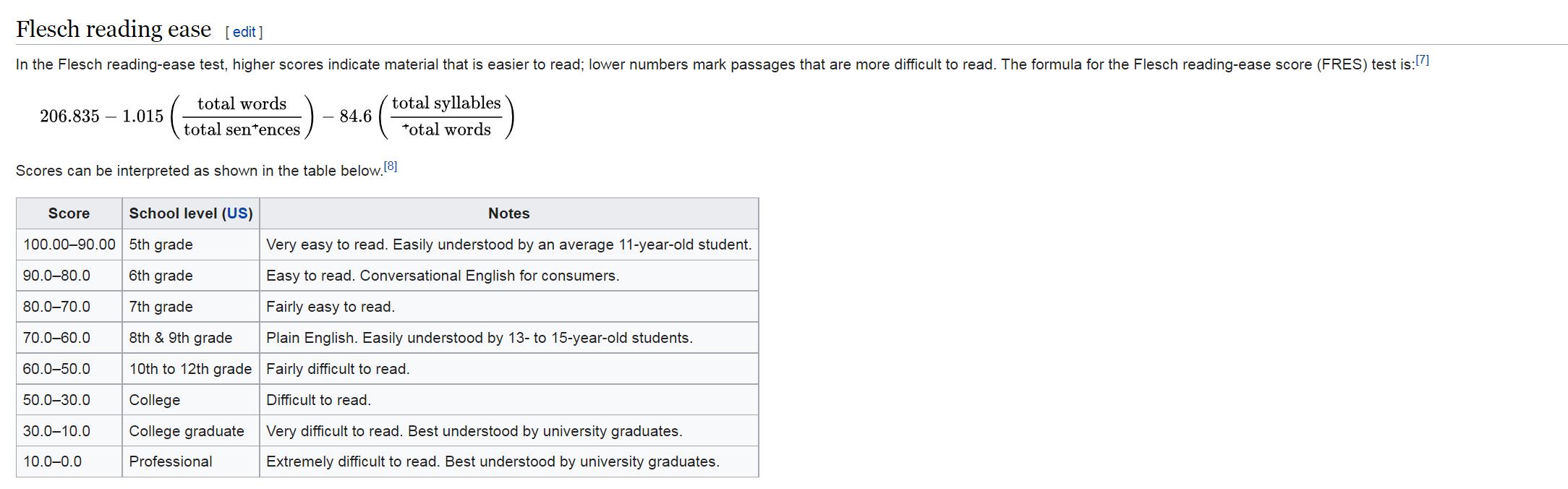
Make your page easy to read It is an international market. While English may be the primary language of the net, the viewers may not be as versed. It is recommended by Yoast, the leading SEO plugin/extension provider, that you follow the Flesch reading ease score. This may be frustrating to some business owners, as the read level is the equivalent of a 4th grade education.
Target High-Value Traffic Keywords A keyword isn’t just a keyword. Some have higher values than others. These keywords can vary according to the part of the sales funnel you’re sitting in — driving traffic and establishing authority or seeking to convert buyers whose interest you have hooked. If you choose a keyword that drives traffic to your site, you must deliver on its promise with the right content
Use SEO Effective competitive research, keyword research, link building, rank tracking, or on-page and technical SEO, are the solutions you need. The results will provide new ideas for content, backlinks, strategy, UX, and much more. By implementing them, you can change higher bounce rates into jumps for joy as you get more successful visitor engagement.
CEO & Technical Director of Multimedia Designs, LLC, System Designer, Developer, Producer with 15+ years in the internet design and development space and 25+ years in the Software Development for the entertainment industry. Winner of the prestigious International Themed Entertainment Association award for interactive design. She holds a degree in Computer Engineering & Mathematics from California State University, Long Beach.
The web..the fastest growing way of doing business. By Brick and mortar standards, is incredibly less expensive and normalizes the difference between small and large companies. But it is not without it’s costs. The exchange for a building is technology. Technology that can be powerful and yet dangerous in the wrong hands.
Many young startup feel they can do their website. But… are you sure? Remember that the easiest and cheapest solutions are not always the best. Never could there be a more erogenous decision. There is a knowledge and skill set that is required, to perform the task successfully. A task, that not done properly, that can kill you business, before it even get’s started. Why risk it? Experience and knowledge are the key.
Who are these individuals who understand the web and what are they going to cost you?
WEB DESIGNERS VS WEB DEVELOER?
Are they not the same person? NO!
WEB DESIGNER
Web designers are the individuals who create how the website looks and flows. Appearances and usability. Another name would be Uix Designers, standing for user -interface. They do not code the back-end, they make sure the experience of the website works for the business and customer.
This includes knowledge such as:
HTML and CSS knowledge
Understanding the Principles of website design and web accessibility standards
Responsive and interaction design
Conversion Rate Optimization (CRO)
User mapping
Wireframing and prototyping
Branding, color theory, and typography
Design tools and software
High-end WordPress usage
WEB DEVELOPER
Web Developers, are the engineers of websites. They code tools that enable a web designer to do their job. In a CMS environment, they would be responsible for the tools that a Web Designer will use such as Plugins, extensions and themes. All the while keeping the flow of the code organized in a object-oriented way. In one way, they are suppose to be the servants of the Web Designer. They make their life easier to achieve the vision of design.
The knowledge set these web developers need are on a high order of technicality and require knowledge of how the internet works, how operating system work and more.
Some of the knowledge and skills they use:
Coding and programming languages such as HTML, CSS, JavaScript, PHP, ASP and jQuery
MySQL and similar databases
Low end understanding of how WordPress and other CMS systems work
How Search Engine Optimizations work
Debugging system issue (problem-solving and analytical thinking)
WHAT DO THEY COST?
There is a role for both these individuals in any medium to large organization. Smaller business, with limited resources, may have to choose which person to make their investment in and what tools to buy for their use.
Then there is the individual development cost. Two types of payment plans are usual:
FLAT RATE AGREEMENT
Clients love paying web designers / developers flat rates because they know exactly how much they’ll pay upfront. Web design freelancers hate flat rates because you can never be 100 percent sure how long a project will take, especially if the client asks for endless changes.
HOURLY RATES
Designers and Developers desire per hour compensation, simply because you don’t know how longer a project is going to take. The is especially true, if the client has not gone to the work of developing a wireframe and scope document. Without it, it is not fair to ask the designer/developer for a fixed bid (flat rate). Assumptions of look, useage and color has not been resolved, so what exactly are they designing and coding to?
YEAR 2021 SALARIES
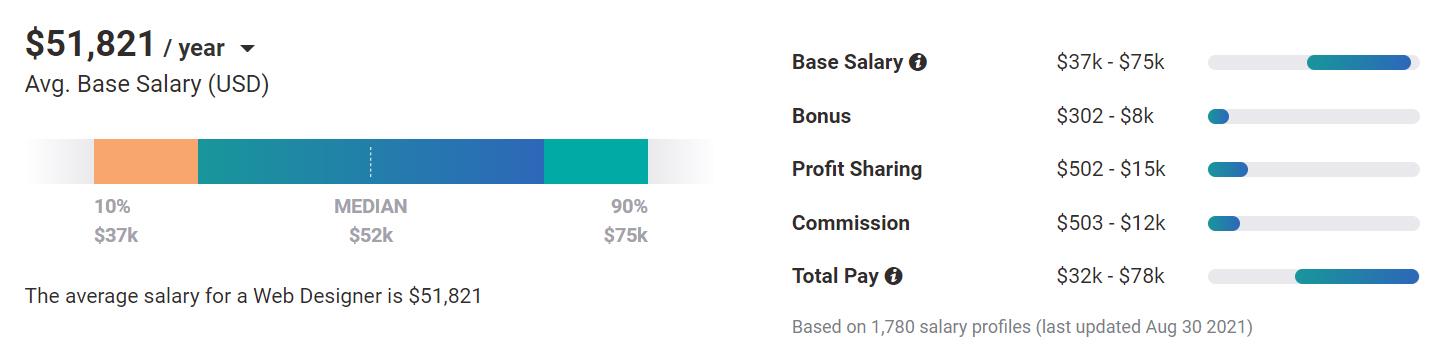
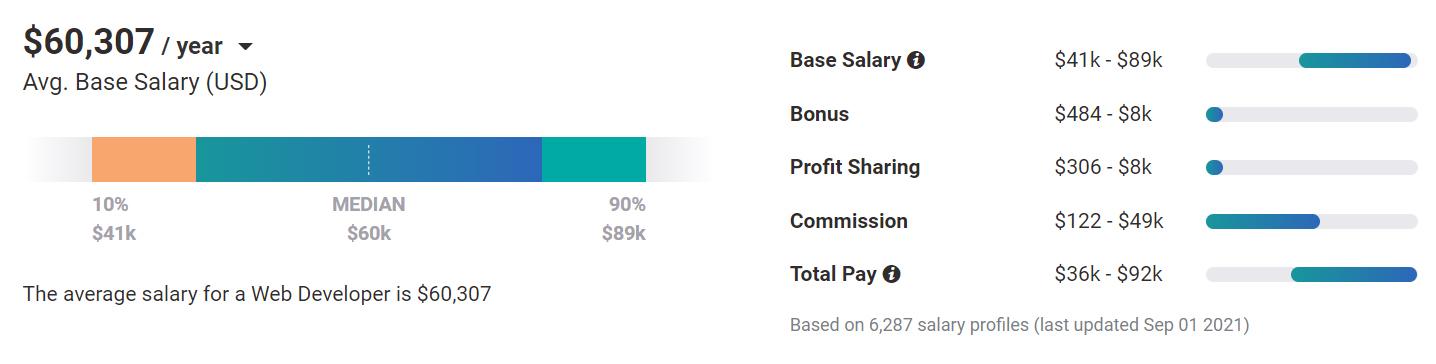
Below are some of the salary ranges for entry level employees, from Payscale.com. Freelance fees are going to be higher, as they have to support not only their time, but equipment, network access, insurance, payroll and other fees associated with running a business.
2021 WEB DESIGNER SALARY
2021 WEB DEVELOPER SALARY
FREELANCE HOURLY RATES
Freelancer aka Contractors, are independent designers and developers. They work on their own schedule and own equipment. As such, the business does not have to pay or provide health insurance, sick days, or other benefits. But you are going to have to pay a higher rate for their time.
CEO & Technical Director of Multimedia Designs, LLC, System Designer, Developer, Producer with 15+ years in the internet design and development space and 25+ years in the Software Development for the entertainment industry. Winner of the prestigious International Themed Entertainment Association award for interactive design. She holds a degree in Computer Engineering & Mathematics from California State University, Long Beach.
MultiMedia Designs, LLC Digital Design & Technology Company Office: +1.818.272.0819 Email: multimediadesignsllc@gmail.com
For everyone who decides to start their own website or completely revamp the old one, there’s one question that poses the most pressing concern: Should I do custom design or go with WordPress and select a theme?
The main difference between the two is that with a custom site you’ll have to literally build from scratch, while with WordPress, if you go with a WordPress, you get a website without almost no programming. Both options have their pros and cons and dance around the concept of money, speed to market vs perceived control.
In this article, we’re going to look into both options to help you decide how to proceed with your business website development.
Custom-Built Website
Custom-built websites are created literally from ground zero. As full custom products, they are able to tick every box on your list of must-have features. There is no design, look feel or even code to start with. Thus your own ideas of technology implementation is left up to you.
You are starting from a blank canvas, often in a design application like Adobe Photoshop. If you are a business owner, without a technical background or interest to learn, you are going to need to hire a professional developer, since building a custom site from scratch requires some serious knowledge.
This also mean you are going to have to reinvent all the tools, your marketing department needs to evaluate performance and ranking in all the major search engines. Be prepared, this is not a quick solution. This is going to be a major process and will also require a massive investment in documentation, work flow and the all important Quality Assurance.
Building a custom site from scratch requires some serious knowledge.
PROS
Custom websites are unique. Unique in operation and flow from the point of view of the user. That can also be a negative, when customers have an expectation of use from other sites on the net.
Custom websites are highly adaptable. You can make them fit your business needs perfectly, both in terms of design and functionality.
They are SEO-friendly. Sure, you can optimize a theme-based site as well, but when you build from scratch, you’re able to build it lean and search engine friendly. SEO is more than just keywords, it’s actually about building a site so that the crawlers can read each of your pages properly. This can also be turned into a negative for long term support. See Cons for explanation.
Custom-built websites are scalable. As your business grows, your website will need to grow and adapt as well. If you or your web developer implement the right technologies to allow for that growth, with limitations. See Cons for explanation.
CONS:
Custom-built sites are more expensive. Web Developers, IT and technologist are expensive, ranging from $80 to $175 a hour. Their skill set and knowledge is required in order to build a custom site that operates within a operational environment called the net. As such, your expenses for a custom website are , on a order of magnitude, much higher than implementing a WordPress CMS system and purchasing a good theme with associated plugins. Theme renewals, needed for the continual security and technological upgrades, usually run yearly.
Custom sites take longer to build. It is going to take a year or more to go through all the stages of custom web development. To start, you are going to need to document what the site is going to do, what you want to achieve, how it will look, what industries requirements (like ADA, HIPPA or government) you need to address and what technology required.
Documentation is key to success. It is the blue print from which the developer will work from and QA tests against. It is a design and build process similar to building a house. Drawings have to be done, approvals need to be agreed upon and the technology to implement has to be confirmed. Building from scratch requires time.
Custom website require a least one, high end full time web developer on staff or retainer. Their role will be to constantly keep the based technology current. Building a custom site, means you don’t have another team doing this work for you. Code must align with the latest rules and regulations world-wide, technical upgrades of the server technology and malware/security prevention.
Built in SEO means changing the core code. Building in the SEO code into the theme, while making the site streamlined, also causes programming hell for any SEO manger and marketing department. Change orders and re-testing of the site for functionality will be required every time the SEO codes need to be modified. Traditionally, SEO codes need to be tweaked once a month. Thus SEO code changes turns into developer costs.
Expansion “Scalable” can turn into nightmare for the new staff and you. Because the site was custom designed, you either have to keep your developer happy, so that they want to continue working with you or you are going to be left with finding someone else.
Rehires are not simple. The developer has to relearn everything that came before them. It also means you will be hearing editorials on the code that was previously written. Contrary to popular belief, programmer’s consider themselves artist with technology..everyone has an opinion. It takes an experienced confident developer to see the code for what it is, follow the organic design and make it work.
WordPress Website
Not all business want to invest in the cost and expense of a 100% custom website. Using WordPress, one of the many CMS Platforms, (Content Management System) is an excellent alternative. It is FREE with almost no programming. The work of programming has been done for you by the plugin developers, theme developers and the WordPress organization. That is the reason WordPress has been chosen for 64% of websites on the net.
PROS
WordPress themes are more budget-friendly. There are free themes you can use but there are a lot of premium themes that are actually quite affordable.
Sites using themes have much shorter development time. If you’re working with a short timeframe, then using a WordPress can save you weeks or months. All the code is already there, you just have to tweak the design, add your content and your site is good to go.
Site can be changed quickly With a proper theme choice, sites can be updated for color pallets, fonts, and responsive performance simply by the change of settings, on the back end of the theme.
Themes have “Builders” A massive time saving process, is the builders that can be added or are included within the theme. Page and post development is now converted to a drag and drop experience with tools that allow you to view the page in all 4 display device types: Desktop, Tablet Landscape, Tablet Profile and mobile. This allows a more creative designer to take the wheels of the page and adjust it accordingly.
Thousands of fee and purchasable extensions. It is like having a development team that you don’t have to pay. There are literally over 2,000 plugins/extensions to the WordPress system. Pick what you need and install.
Uses the #1 e-commerce solution in the world: Woocommerce. With over 1 millions installs, the look and feel of how a e-purchase experience works for the viewer, has become familiar to the market place. This is an essential key to usability. Potential customers do not have to learn your website, in order to make a purchase. They know what is coming. thus leaving the comfortably factor already in place. They know how to do it. They trust the process. Psychology of usage is everything.
99% of the time, no programming is required. Unless you are doing something unique, there is no programming required. If you are and can not find a existing plugin to full-fill the need, you own custom WordPress plugin will be required.
There are thousands of developers for plugin customization & theme developments. The price point, just by virtue of the system being a CMS and the #1 CMS system on the net, is much lower. For comparisons see WordPress vs. Joomal vs. Drupal
CONS
Custom Plugin-standards can limit your custom implementations.
Updates are frequent and constant Using a CMS is not a build and forget it project. There are constant security upgrades, plugin upgrade that must be performed monthly in order to continue a proper display.
Plug-in can conflict resulting in high maintenance. Because plug-in are built by 3rd party organizations, your particular combination of themes and plugin may cause a problem. Thus it is necessary to continually backup the site before upgrading. To correct such an error is an iterative process of elimination that can not be done by the non-technical.
The wrong developer can really mess you up! There are a lot of developers out there who call themselves WordPress developer. They are paid an insane amount of money per hour with the average being $80 or around $80,000 per year for staff. (src: Codementor.io) dependent on location. Just because they can program in PHP or even MySQL, does not mean the have the background of how WordPress works.
The more experienced and skilled developers with a core understanding of WordPress, will run in the $100-$150 per hour. Understanding how WordPress works, is a key to any development. That includes how to implement new features properly using plug-ins AND follow the WordPress approval process. WordPress, as a organization, does require code reviews and testing in order to be used on any of their official sites or distributed through the library.
WORDPRESS MYTHS:
WordPress has a set of myths that many hard core developers are going to insist of perpetuating in favor of the more expensive self-development. That could be a deal point for many small to medium business to take the leap to the internet. For certain developers, it is threatening to have any CMS (Content Management System) replace the fun and profitable experience of new website development from scratch. Can you blame them!
WordPress is less flexible. Actually the opposite it true. With the proper implementation of expansive plugins, WordPress become the platform of unlimited flexibly while still keeping your site cost effective and supportable. Thousands of different themes are available, directly out of the box.
Web themes usually come with less support. Also false. There are many companies out there who offer unlimited support for those themes and templates that they develop. One such company is Themify. Themify has staff support & developers around the world offering 24/7 support via their website. They will even code snippets for you, based on your own need.
WordPress themes are not automatically SEO-friendly. WordPress is no more or less SEO friendly from a custom built website. SEO has a set of rules in order to become effective. Keywords are set in a header and matching words are in the copy. This is a manual process and thus requires customization in either implementation.
WordPress themes do not require any special knowledge or skills. Partially true, after the website has been setup an implemented. It is fairly simple for a website owner, marketing representative or web designer, to use on a day to day basis, requiring little to no guidance. However that is not the case to setup the site. The knowledge and understanding of HOW the technology works is essential to the proper function of the site at large. With the vast flexibility of the platform, knowing what to change and what can not be changed is the difference between unexpected results OR work seamlessly.
For example, a web developer, not understanding the design and function of WordPress,may try to code-in colors, fonts, removing the flexibility of the CMS. Thus changes for Marketing /Web designers is almost impossible to do quickly. And depending on the skill of the Developer, can even cause security and legal risks for the business. Some security coding mistakes are inserting into a theme with 3rd party links that control content for the user. This is a lack of understanding of the technology on the part of the developer is not a weakness of the WordPress CMS system. Flexibility by design, is also dangers in the wrong hands.
THE QUESTION TO ASK
Deciding which is the best solution for you really comes down to a single question: What are you doing that is unique, relative to any other site on the internet?
What are you doing that is so unique from the rest of the internet?
It may appear to be a cold question, but is the only important one.
There are thousands and thousands of productive, revenue generating websites on the net. How is your intended site, so massively different, that it needs 100% custom development?
Is the product or service, that you are offering . that so unique, from all of the sites on the internet, that is requires custom development and a continued long term investment?
What online service is so individualized that a veering from understood viewer purchase experience is necessary?
Is this a developer preference or practical assessment?
DEFINE "UNIQUE"
In this article “Unique” is not defined by what product or service you are selling, but rather how you present the product or service and how it is purchased. That purchase and usage flow. Of course your product and/or service is special! But how you present that product or service to the viewer may not be.
There is the key to your decision.
In fact, a different process from the industry standard, may detour possible customers, simply because they do not understand. The process is not familiar. Access has to be learned. Usage alone, can be the difference between fiscal long term success or failure.
Only you can answer the question of what is best for you.
At Multimedia Designs, LLC, we have done both, based on client preferences. We advise, you make the decisions. Call us for a independent evaluation of your present site or a quote for your new project.
MultiMedia Designs, LLC Digital Design & Technology Company Office: +1.818.272.0819 Email: multimediadesignsllc@gmail.com
CEO & Technical Director of Multimedia Designs, LLC, System Designer, Developer, Producer with 15+ years in the internet design and development space and 25+ years in the Software Development for the entertainment industry. Winner of the prestigious International Themed Entertainment Association award for interactive design. She holds a degree in Computer Engineering & Mathematics from California State University, Long Beach.
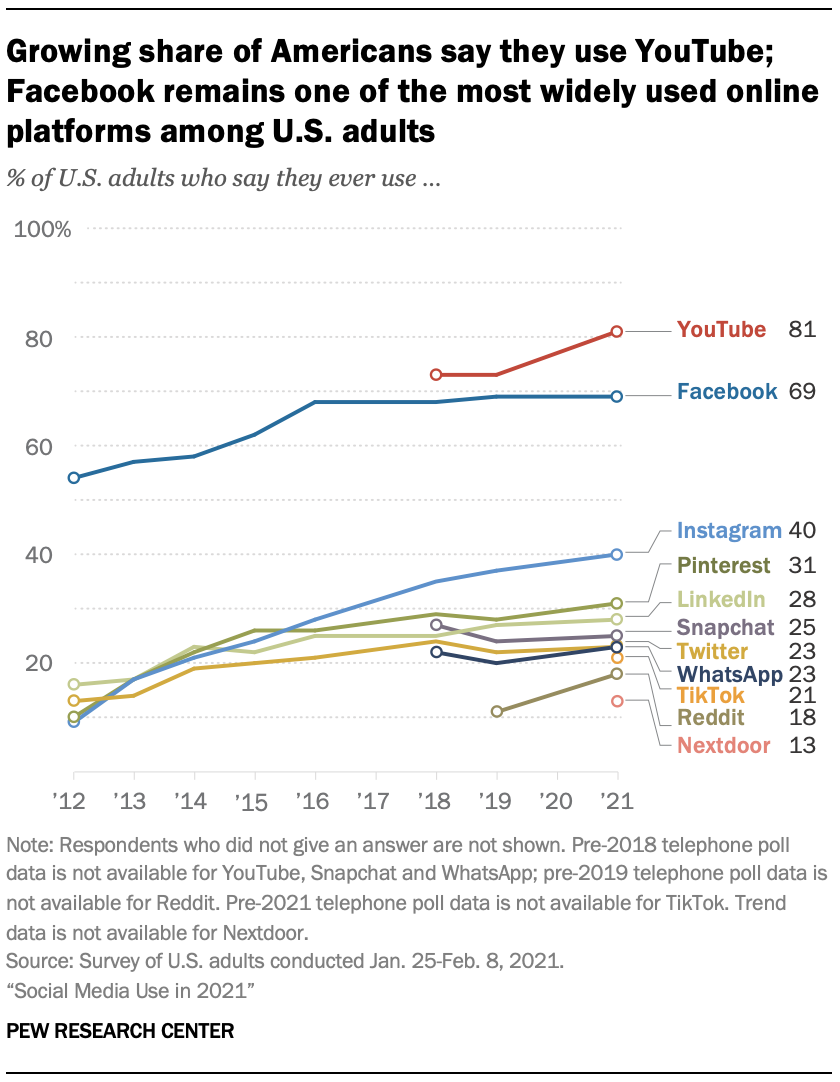
A majority of Americans say they use YouTube and Facebook, while use of Instagram, Snapchat and TikTok is especially common among adults under 30.
Despite a string of controversies and the public’s relatively negative sentiments about aspects of social media, roughly seven-in-ten Americans say they ever use any kind of social media site – a share that has remained relatively stable over the past five years, according to a new Pew Research Center survey of U.S. adults.
Beyond the general question of overall social media use, the survey also covers use of individual sites and apps. YouTube and Facebook continue to dominate the online landscape, with 81% and 69%, respectively, reporting ever using these sites. And YouTube and Reddit were the only two platforms measured that saw statistically significant growth since 2019, when the Center last polled on this topic via a phone survey.
When it comes to the other platforms in the survey, 40% of adults say they ever use Instagram and about three-in-ten report using Pinterest or LinkedIn. One-quarter say they use Snapchat, and similar shares report being users of Twitter or WhatsApp. TikTok – an app for sharing short videos – is used by 21% of Americans, while 13% say they use the neighborhood-focused platform Nextdoor.
Even as other platforms do not nearly match the overall reach of YouTube or Facebook, there are certain sites or apps, most notably Instagram, Snapchat and TikTok, that have an especially strong following among young adults. In fact, a majority of 18- to 29-year-olds say they use Instagram (71%) or Snapchat (65%), while roughly half say the same for TikTok.
These findings come from a nationally representative survey of 1,502 U.S. adults conducted via telephone Jan. 25-Feb.8, 2021.
With the exception of YouTube and Reddit, most platforms show little growth since 2019
YouTube is the most commonly used online platform asked about in this survey, and there’s evidence that its reach is growing. Fully 81% of Americans say they ever use the video-sharing site, up from 73% in 2019. Reddit was the only other platform polled about that experienced statistically significant growth during this time period – increasing from 11% in 2019 to 18% today.
Facebook’s growth has leveled off over the last five years, but it remains one of the most widely used social media sites among adults in the United States: 69% of adults today say they ever use the site, equaling the share who said this two years prior.
Similarly, the respective shares of Americans who report using Instagram, Pinterest, LinkedIn, Snapchat, Twitter and WhatsApp are statistically unchanged since 2019. This represents a broader trend that extends beyond the past two years in which the rapid adoption of most of these sites and apps seen in the last decade has slowed. (This was the first year the Center asked about TikTok via a phone poll and the first time it has surveyed about Nextdoor.)
Adults under 30 stand out for their use of Instagram, Snapchat and TikTok
When asked about their social media use more broadly – rather than their use of specific platforms – 72% of Americans say they ever use social media sites.
In a pattern consistent with past Center studies on social media use, there are some stark age differences. Some 84% of adults ages 18 to 29 say they ever use any social media sites, which is similar to the share of those ages 30 to 49 who say this (81%). By comparison, a somewhat smaller share of those ages 50 to 64 (73%) say they use social media sites, while fewer than half of those 65 and older (45%) report doing this.
These age differences generally extend to use of specific platforms, with younger Americans being more likely than their older counterparts to use these sites – though the gaps between younger and older Americans vary across platforms.
Majorities of 18- to 29-year-olds say they use Instagram or Snapchat and about half say they use TikTok, with those on the younger end of this cohort – ages 18 to 24 – being especially likely to report using Instagram (76%), Snapchat (75%) or TikTok (55%).1 These shares stand in stark contrast to those in older age groups. For instance, while 65% of adults ages 18 to 29 say they use Snapchat, just 2% of those 65 and older report using the app – a difference of 63 percentage points.
Additionally, a vast majority of adults under the age of 65 say they use YouTube. Fully 95% of those 18 to 29 say they use the platform, along with 91% of those 30 to 49 and 83% of adults 50 to 64. However, this share drops substantially – to 49% – among those 65 and older.
By comparison, age gaps between the youngest and oldest Americans are narrower for Facebook. Fully 70% of those ages 18 to 29 say they use the platform, and those shares are statistically the same for those ages 30 to 49 (77%) or ages 50 to 64 (73%). Half of those 65 and older say they use the site – making Facebook and YouTube the two most used platforms among this older population.
Other sites and apps stand out for their demographic differences:
Instagram: About half of Hispanic (52%) and Black Americans (49%) say they use the platform, compared with smaller shares of White Americans (35%) who say the same.2
WhatsApp: Hispanic Americans (46%) are far more likely to say they use WhatsApp than Black (23%) or White Americans (16%). Hispanics also stood out for their WhatsApp use in the Center’s previous surveys on this topic.
LinkedIn: Those with higher levels of education are again more likely than those with lower levels of educational attainment to report being LinkedIn users. Roughly half of adults who have a bachelor’s or advanced degree (51%) say they use LinkedIn, compared with smaller shares of those with some college experience (28%) and those with a high school diploma or less (10%).
Pinterest: Women continue to be far more likely than men to say they use Pinterest when compared with male counterparts, by a difference of 30 points (46% vs. 16%).
Nextdoor: There are large differences in use of this platform by community type. Adults living in urban (17%) or suburban (14%) areas are more likely to say they use Nextdoor. Just 2% of rural Americans report using the site.
A majority of Facebook, Snapchat and Instagram users say they visit these platforms on a daily basis
While there has been much written about Americans’ changing relationship with Facebook, its users remain quite active on the platform. Seven-in-ten Facebook users say they use the site daily, including 49% who say they use the site several times a day. (These figures are statistically unchanged from those reported in the Center’s 2019 survey about social media use.)
Smaller shares – though still a majority – of Snapchat or Instagram users report visiting these respective platforms daily (59% for both). And being active on these sites is especially common for younger users. For instance, 71% of Snapchat users ages 18 to 29 say they use the app daily, including six-in-ten who say they do this multiple times a day. The pattern is similar for Instagram: 73% of 18- to 29-year-old Instagram users say they visit the site every day, with roughly half (53%) reporting they do so several times per day.
YouTube is used daily by 54% if its users, with 36% saying they visit the site several times a day. By comparison, Twitter is used less frequently, with fewer than half of its users (46%) saying they visit the site daily.
If you’re thinking about building a website or blog, building a site from scratch with developers, is the most expensive way you can possibly choose. Instead, business are resorting to a CMS. A CMS , “content management system”, helps you create, manage, and modify the contents of a website without the need of a highly trained technologist who understands HTML, PHP, Javascript or CSS plus coding skills.
The easy-to-use nature of the modern CMS platforms, allows for the quick development of most simple website. But even better, CMS platforms also allow for the expansion of unique features, while still
In this post, we look through three of the most popular and best CMS platforms coming into 2021, compare their pros and cons, and help you pick one.
Talking about the costs involved in using any of these CMS gets real tricky real fast.
Here’s the problem:
Each of these three best CMS is 100% free in itself – you can download either one directly from the official websites in just a couple of clicks. But there are other side costs that you will have to invest in.
THEMES : The default color settings, fonts and CSS codes for a site.
WordPress themes available for $0-$250
Joomla themes: $0-$200
Drupal themes: $0-$80
PLUGINS : Expanding the features and security of a site
WordPress plugins available for $0-$400
Joomla plugins: $0-$70
Drupal plugins: $0-$100
While the CMS platforms are free to download, in some cases, users will want to extend the native feature sets of their CMS with extra modules and/or designs. All three of the best CMS have add-ons in roughly the same price range. Ultimately, you don’t have to buy any add-ons if you don’t have the budget.
In the end, if you intend to get only the bare minimum, your bill is going to be:
$15 (domain name) + $10×12 (hosting) = ~$135 a year
2. Level of Expertise Needed
WordPress is arguably the easiest one to use. Expanding the functionality of your site and finding and customizing the designs is much more approachable.
Additionally, many hosting companies offer what’s called “WordPress hosting,” meaning that you don’t have to worry about the technical setup of the server or even worry about installing WordPress on your own. The hosting company will handle all of that.
Then there is a default customization, WordPress comes with a friendly interface for tweaking the looks of your site, changing the colors, backgrounds, spacing, and and per device settings like mobile, tablet or desktop..
Joomla and Drupal are more developer-centered and do expect you to be reasonably comfortable working with HTML and PHP – that is, if you want to build a more custom-looking and custom-operating website.
There are not as many versatile add-ons available for either CMS, and the ones that are there are not as refined as their counterparts for WordPress.
In most cases, you can expect to either have to hire someone or learn the inner workings of either Joomla or Drupal if you want to end up with a custom-looking website.
All Three CMS: This all comes down to the size of the community – there are many more people working on WordPress-related products and add-ons than they are working on Joomla or Drupal. This means that if you want to get a feature for your website that’s not available via a plugin, you’ll have to create that feature yourself.
3. The Popularity of the Best CMS
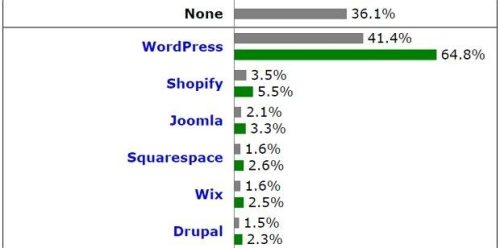
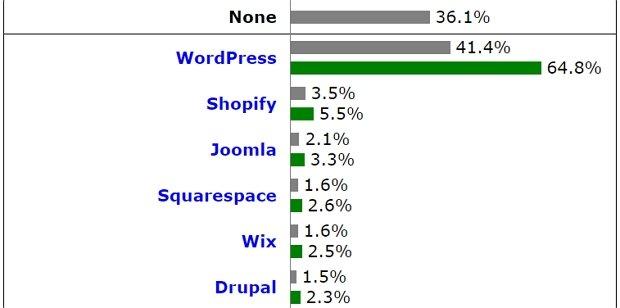
The popularity contest is actually a no-contest. WordPress takes this round hands down.
WordPress is used more than 41% of the entire web.
Joomla 2.1%
Drupal 1.5%
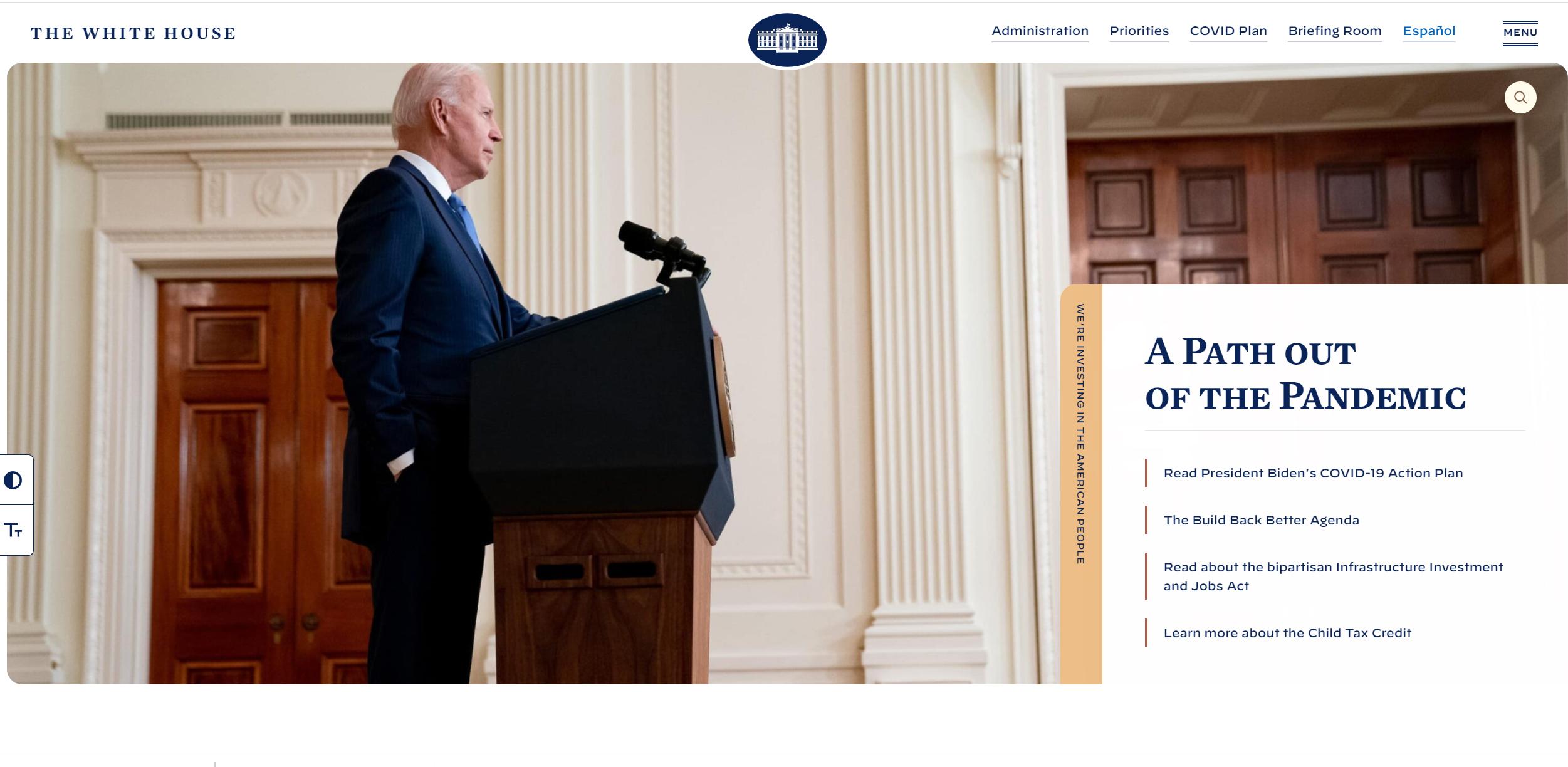
Even our countries White House, moved away from Drupal and into WordPress
WHITEHOUSE.GOV | WORDPRESS SITE
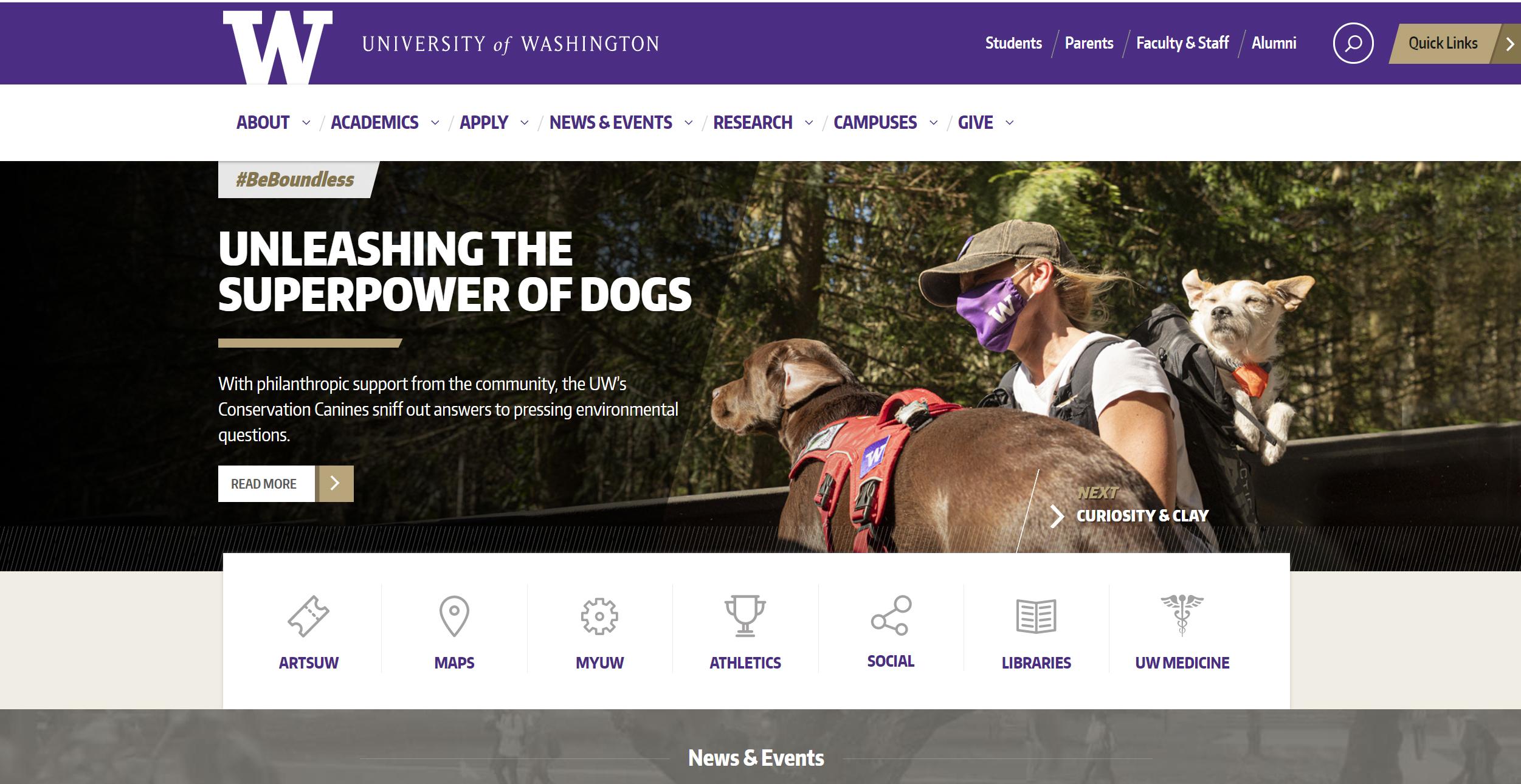
UNIVERSITY OF WASHINGTON | WORDPRESS SITE
DENTAL PRACTICE | WORDPRESS SITE
4. Choice of Designs
The design quality is a huge factor in choosing your CMS. We all want our websites to look nice and not be an eyesore or worse, not be usable on a variety of display devices (cell phones, mobile, tablet plus desktop).
As a side note about designs, many choose the avenue of content systems like WIX. Simple, to the point and quickly develops a site..all the reasons given above. What is not said is that is the display-ability across the cell phone, mobile and tablet devices.
WORDPRESS comes installed with a default theme and a visual design process. Developers can drop and drag how they wish a page to look VISUALLY, without knowing a single bit of code and using the .
Both Joomla and Drupal, come more with a technology approach, post approach. In short, you need to understand how the CMS works in order to make the most effective use of it.
5. Customization Options aka Plug-Ins
Each of the CMS systems offers a way to expand upon the technology adding features to your site.
WordPress calls all new add-ons plugins
Joomla calls them extensions
Drupal calls them modules
The idea behind them is basically the same. Plugins/Extensions/Modules allow you extend the default range of features that come with your CMS. The availability of those plugins is what is at issue.
You’ll find more than 50,000 plugins for WordPress available in the official directory alone. There are thousands more available from third-party developers.
There are almost 6,000 extensions available for Joomla in the official directory, and a couple hundred more throughout the web.
There are around 47,000 modules available for Drupal in the official directory, but only a handful elsewhere on the web.
Joomla offers a good catalog of extensions as well, albeit much smaller than that of WordPress’. You’ll still find extensions to handle all of the most crucial aspects of your site, such as galleries, SEO, analytics, contact forms, and more.
Drupal modules are much more developer-focused. You’ll find various solutions to expand the APIs, set up additional tokens for devs, do more advanced user management, and so on.
Overall, they will help you further customize the inner mechanisms of Drupal if you’re working on a more serious project. There are not as many user-facing modules, though. Even doing a search in the module directory for something as simple as “contact form” doesn’t produce optimistic results.
6. Cost of Custom Development
If you can not find from the thousands of extensions a feature, then you will have to write your own. Average hourly salaries of development specialist is as follows:
With 41% of the websites based on WordPress, the number of individual and the relative costs reduces.
“WordPress” – over 77,000 freelancers offering WordPress-related work
“Joomla” – around 7,600
“Drupal” – around 4,700
6. Security and Updates
You can expect a new WordPress version update roughly every 30 days. Many of those updates are minor and just fix small bugs and issues here and there. Bigger WordPress releases come out a couple of times a year.
Small Joomla updates come out a bit more frequently, roughly every 10-40 days, but the bigger ones come only about once a year or even less frequently. Joomla version 3.9 has been with us since 2018, for instance.
Drupal works on a set release schedule, delivering one bugfix update and one security update a month. Bigger updates – major versions – come around two times a year.
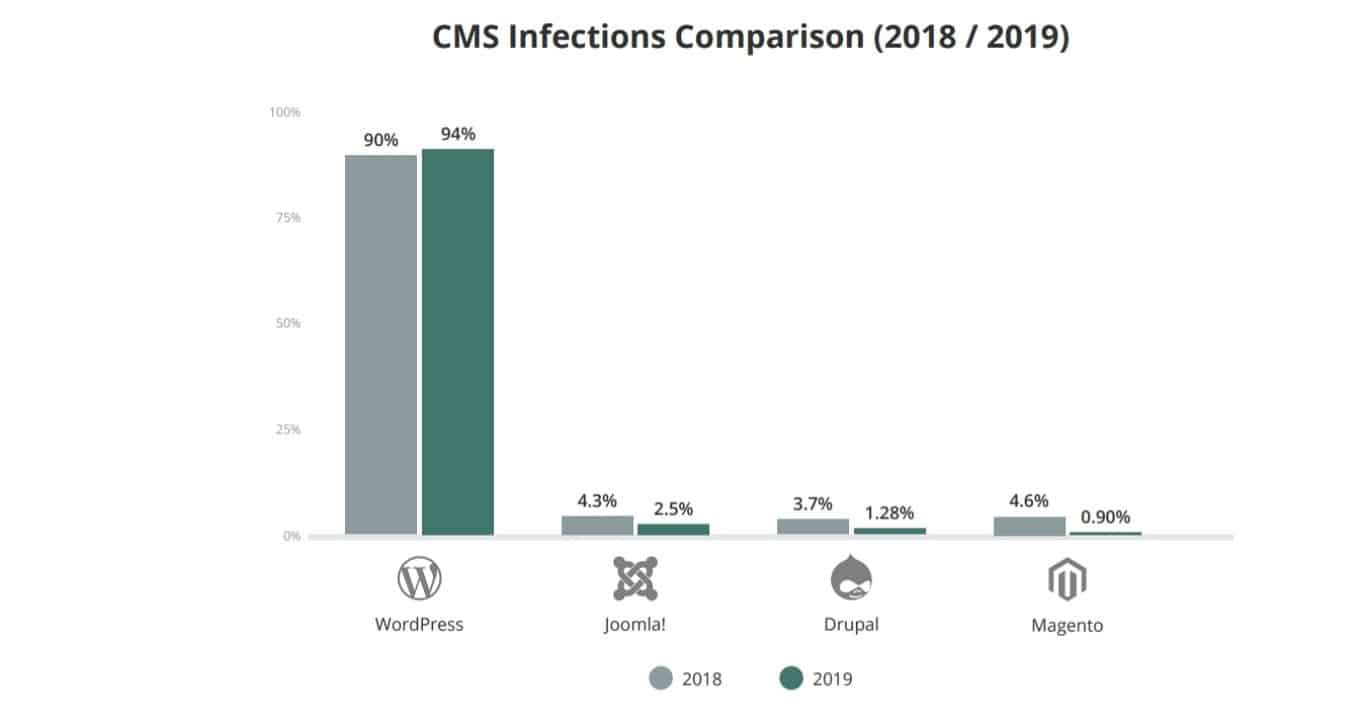
MIXED RESULTS
With results like that, it does not look good for WordPress. More than 90% of all infected CMS websites run on WordPress. This low score of WordPress’ is due to a couple of factors. First, it’s simply the most popular CMS on the web. It will naturally receive a much bigger piece of the hacking pie. Proportionally, each CMS system runs about the same in the hacking pie.
It is also the reason plugins for WordPress like WordFence have become increasingly popular and shutdown the ability of hackers to destroy a site.
On the other hand, it’s worth pointing out that both Drupal and Joomla are hacked into proportionally less than WordPress – even once we factor in the popularity levels of all three CMSs. This is no coincidence. Actually, security is one of the main selling points of Drupal’s. Many government agencies and other institutions have trusted Drupal chiefly due to its strong focus on website security.
7. When to Use WordPress?
WordPress is a great all-around CMS if you want to DIY a website and also make sure that it will look properly and have all the features you need.
It’s the easiest platform to use if you’re a beginner and also one that offers the best designs and the biggest choice of them.
Plus, if you ever want to expand your site, you can choose from thousands of plugins that can handle pretty much any new feature you can think of.
8. When to Use Drupal?
Drupal can be your solution if the website you want to build will have a lot of custom functionality and will require first-class security at the same time.
Drupal is more geared toward developers rather than DIY users who are working on their sites in the afternoons.
You will also likely require a lot of custom work and coding done to achieve your final desired effect with Drupal.
9. When to Use Joomla?
Joomla kind of meets you in the middle between WordPress and Drupal. On the one hand, it does deliver a lot of user-facing features but also expects you to custom-code the non-standard elements.
Joomla has a more advanced user management scheme, which can be handy if your website is meant to be managed by multiple people. The same goes for multilingual support. With Joomla, you can set up multilingual sites right out the box, while doing so with WordPress requires a separate plugin.
That being said, you will still find Joomla’s learning curve to be quite steep. This can be troublesome if the only thing you want for now is simply a “working website.”
DNS stands for Domain Name System and is a protocol for exchanging data on the Internet.
When you want to visit a website, you turn on the computer, open a web browser, and type in the domain name you want to visit, e.g. multimediadesignsllc.com. The DNS then translates the name into an IP address. An IP address is a series of numbers separated by stops (e.g. 185.54.72) that identifies resources connected to the internet.
Likewise, email is associated with a domain name with certain more advance requirements, specifically to prove who you are and that you are not sending out an email under someone else domain name. AKA, you are not a spammer.
Most of the time, your hosting provider will manage these settings and process. Sometimes to your advantage and other times not. The keys for you to know what you really need set on your domain name, from your hosting provider, to make sure that your domain is not hijacked and blacklisted.
A word of warning though: this process is a constant battle, with requirements as defined by other servers, servers your email has to go through to be delivered. These rules are constantly being updated.
As of September 2021, the following are recommend settings and choices:
Static or Dynamic IP Address?
Do everything you can to have a static IP address. It is very difficult to run a business and control your email delivery, with a dynamic home-user Internet plan. This also means you hosting will not be cheap. At the very least, be associated on a server with no more than 30 hosting accounts.
Most hosting and the associated email, that are inexpensive, will place you on a server with thosands of other accounts. Thus customization of site and email options are next to none.
This article assumes you have at least one static IP address or have a hosting provider that is willing to customize and monitor the settings on your behalf.
WHAT ARE THE DNS KEYS REQUIRED FOR EMAIL
“A” Record
An “A” record maps a name to an address. You will first need an A record for your mailserver. Your static IP address from your ISP was the first step, of course. For example, you might log into the web portal for the example.com domain and create an “A” record for “mail” for 192.0.2.21. This would create a mail.example.com published on the Internet. However, mailservers still wouldn’t know that this is where to send mail. That’s what “MX” records are for.
Name mydomain.com.
TTL (Time to Live) 86400
Type A
Record 162.xxx.xxx.xx
“MX” Record
The MX Record, tells other mailservers on the net, what the name of your server is on the net. Format:
Name mydomain.com.
TTL (Time to Live) 86400
Type MX
Record Priority: 0 Destination: mydomain.com
“PTR” Record
The PTR record is a reverse lookup which maps the IP address to the name. It is a key record in that many mailservers on the net, will not trust mail coming from your server unless they can do a reverse DNS lookup. This takes two possible forms. Most mailservers care that a PTR record exists at all. Strict mailservers do a forward lookup on the name your mailserver introduces itself as such as mail.example.com, verify it is the IP address that is read off the connection, and do a PTR lookup on that IP address to see if it resolves to the same name.
Name mydomain.com.
TTL
Type PTR
Record 28.xxx.xxx.xxx.in-addr.arpa.
“SPF” Record
SPF gives other mailservers a way to verify that mail claiming to be from your domain is from one of your IP addresses. They do this by checking a special TXT record you put in your DNS records. It is an interesting way to prevent mail spoofing.
Record v=spf1 +a +mx +ip4:162.xxx.xxx.xx +v=spf1include:servers.mcsv.net?all ~all
“Caller-ID” Record
Caller-ID was an earlier way to do what SPF does today. As with SPF, Caller-ID gives other mailservers a way to verify that mail claiming to be from your domain is from one of your IP addresses. They do this by checking a special TXT record you put in your DNS records.
Today, this method has been abandoned in favor of the SPF method.
DKIM Record
DKIM (Domain Keys Identified Mail) is an email authentication technique that allows the receiver to check that an email was indeed sent and authorized by the owner of that domain. This is done by giving the email a digital signature. This DKIM signature is a header that is added to the message and is secured with encryption.
Once receiver (or receiving system) determines that an email is signed with a valid DKIM signature, it’s certain that parts of the email among which the message body and attachments haven’t been modified. Usually, DKIM signatures are not visible to end-users, the validation is done on a server level.
Implementing the DKIM standard will improve email deliverability. If you use DKIM record together with DMARC and SPF, you can also protect your domain against malicious emails sent on behalf of your domains.
The most important reason to setup a DKIM record is that Gmail uses default DKIM. Without your server defining it, there is a great possibility that your emails will either be placed in spam or bounced.
Newer to the authentication party is the DMARC Record. Domain-based Message Authentication, Reporting, and Conformance, or DMARC, is a technical standard that helps protect email senders and recipients from spam, spoofing, and phishing. DMARC allows an organization to publish a policy that defines its email authentication practices and provides instructions to receiving mail servers for how to enforce them.
A DMARC record is included in an organization’s DNS database. It is a record that is a specially-formatted version of a standard DNS TXT record with a particular name, namely “_dmarc.mydomain.com” (note the leading underscore). The defining elements are as follows:
v=DMARC1 specifies the DMARC version
p=Policy of mail non-compliance: none, quarantine or reject.
sp=Policy for any subdomain mail non-compliance: none, quarantine or reject.
rua=mailto:dmarc-aggregate@mydomain.com is the mailbox to which aggregate reports should be sent
ruf=mailto:dmarc-afrf@mydomain.com is the mailbox to which forensic reports should be sent
pct=100 is the percentage of mail to which the domain owner would like to have its policy applied\
A Classic DMARC record looks something like the below. Also note, that many mail servers will reject emails unless a policy has been defined. Using the p=none, will result in a error.
Name _dmarc.mydomain.com
TTL 14400
Type TX
Record v=DKIM1; p=”none” or “quarantine” or “erject”;sp=”none” or “quarantine” or “reject”; rua=mailto:admin@yourdomain.com; ruf=mailto:admin@yourdomain.com
For average business owners, names like WordPress, Joomla, Shopify, Magento, Wix, and Weebly might sound like alien names. You don’t know about them and honestly, you just don’t care, you just want a website that works. But developers are going to toss about a variety of options at you, each with their own price points, strengths and weakness…that you do care about.
WordPress, Joomla, Shopify, Magento, Wix, and Weebly are all platforms used to build websites, short of building a site 100% from scratch using the costly method of PHP/Javascript and HTML. Most business owners, will not what to go down that path, as the cost is prohibited. Thus you are left with WordPress, Joomla, Shopify, Magento, Wix, and Weebly .
Each has its own benefits, while many are used more often for niche websites with specific purposes. For example, Shopify only makes sense if you’re running an online store with zero interest in building your own brand name and adding custom features unique to you. Shopify, is not a platform you would start a blog with then turn into an eCommerce shop . Magento is in the same boat. Other website builders and platforms have more flexibility, and those are typically the ones that are most popular.
Everything from Squarespace to Wix has wonderful tools for certain skill levels, but they also have massive technology limitations, like not working on the mobile platform. A term called “responsive”. Another buzz word, that simply means, a website that changes how it presents it’s self based on what type of device is viewing it.
But you want a good explanation of why you should use WordPress over all of them.
The software is free and open-source
It adapts so you can make any type of website
It supports numerous media types
Has a Huge Community and is Priced Competitive
You can scale up and expand your website with themes and plugins
It is manageable
SEO comes first
You have full control of your website
The blogging is hands down the best in the business
The most POPULAR content management system in the business
1. The Software is Free and Open-Source
Both WordPress.com and WordPress.org are completely free to use, but WordPress.org is a self-hosted version server, where you have the advantage of controlling more of your site’s appearance and you can take advantage of advanced plugins that they provide. BUT, they are hosting your site and they are still in control of what you put in your site. It is a great options, for someone who does not want to pay for a technologist to put a site together, super for complete beginners, but it’s not exactly the best for a business that plans on making money. They control the show. It certainly is a step up from WIX, but you are still dependent on another service with pay-for plans. Thus not using WordPress.com makes sense. We recommend it for personal and hobby blogs.
If that is all the your desire…stop reading and hop over, the solution will work for you with the least amount of investment and hassle.
Explore it now:
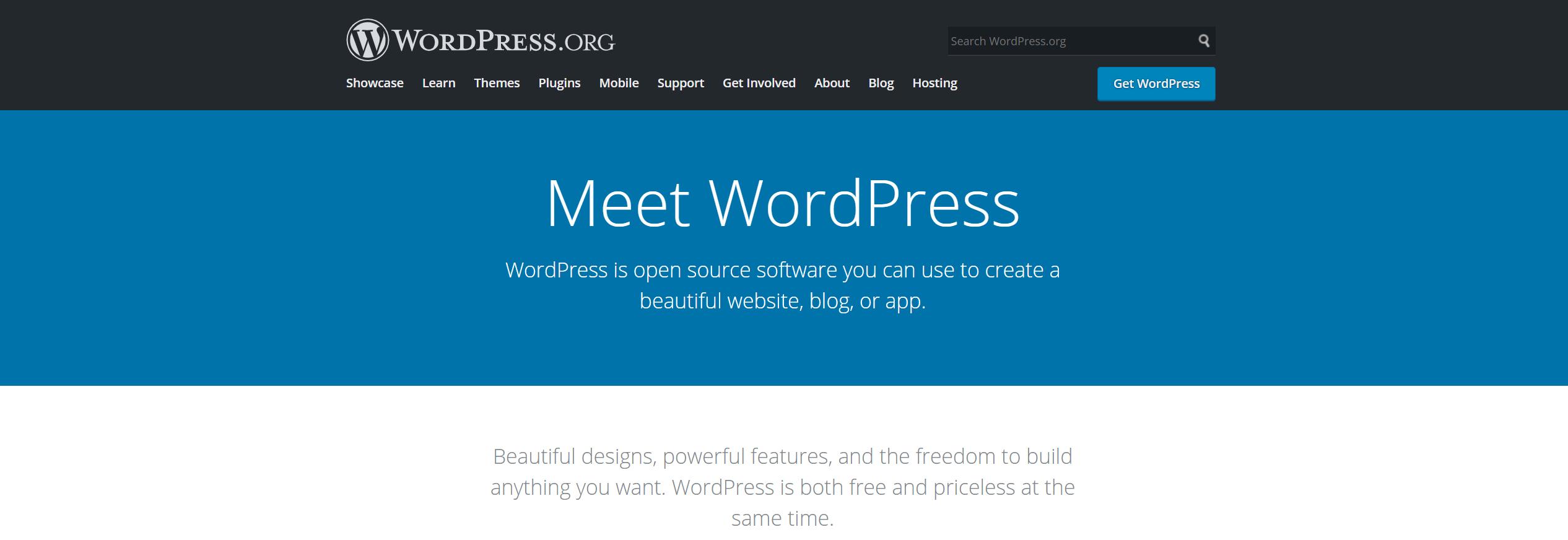
When you navigate to the WordPress.org website, it explains the basics about the platform, but the only button (besides the regular menu) is a link to “Get WordPress.”
IF you want more, the WordPress software, the same software that runs on wordpress.org, is still free for anyone to download and install it, on any server you desire. In many cases, the host will offer a free download and installation to get your started.
Know that, it is free, because it is an open-source project that’s been around since 2003. This means that WordPress is developed by a collection of contributors (aka Geeks) . Open-source projects are typically free, with large communities, which is why you can get developers at a lower cost and plugins that are frequently no-cost. The users in this community, often take part in this community as beta testers or simple brand advocates, but there’s no requirement for any participation to use the software..
THERE IS A BUT....(isn't there always)
You still have to invest in hosting and that can be problematic.
While WordPress software is free, the server it must exist on is no. Certainly there are low-budget hosting like godaddy that can start around $5 a month, BUT, speed is not going to be it’s cornerstone. Nor are you going to get email associated with your domain name. Those are extra. In short, not only do they nickle and dime you for every single features, but when you go with low-cost, really cheap servers, that server is shared by thousands of other websites. All of those sites are going to compete for performance with your site. It is a balancing act of cost vs performance.
Giving that most viewers have an attention span of less than 20 seconds and 70% of the market is now mobile based, performance many become more of an issue than you realize. But we have digressed. The question is Why Wordpress.
2. It Adapts So You Can Make Any Type of Website
One of the common misconceptions about WordPress is that it’s mainly for building blogs. At one point in time that was, in fact, the case. WordPress was developed as a blogging platform, but that has changed drastically with the various new releases over the years.
In fact, WordPress is at an advantage due to its blogging roots. It’s by far one of the cleanest, fastest ways to write and publish blog posts, and that’s all included right from the start. Some website building tools think about design and apps first, then the blogging interface comes in as an afterthought.
That’s not the case with WordPress, so you can create a beautiful ecommerce site and know that the blog is an integral part of the development process.
See it in Action:
The list is endless, but here’s a taste of the types of websites you can make with WordPress:
Blogs
Business websites
Portfolios
Forums
ECommerce sites
Ratings websites
Membership sites
eLearning modules
Chatrooms
Galleries
Personal websites for self-promotion
Job boards
Business directories
Q&A websites like Quora
Non-profit websites for collecting donations
Wikis and knowledgebases
Media-centric sites like YouTube
Auction and coupon sites
The list of possibilities goes on and on.
THERE IS A BUT....(isn't there always)
You still have to invest in hosting and that can be problematic.
While WordPress software is free, the server it must exist on is no. Certainly there are low-budget hosting like godaddy that can start around $5 a month, BUT, speed is not going to be it’s cornerstone. Nor are you going to get email associated with your domain name. Those are extra. In short, not only do they nickle and dime you for every single features, but when you go with low-cost, really cheap servers, that server is shared by thousands of other websites. All of those sites are going to compete for performance with your site. It is a balancing act of cost vs performance.
Giving that most viewers have an attention span of less than 20 seconds and 70% of the market is now mobile based, performance many become more of an issue than you realize. But we have digressed. The question is Why Wordpress.
3. It Supports Numerous Media Types
Most document types are accepted to provide a variety of infomration to your viewer:
Images
Documents
Audio
Video
A Word of Warning
Yes, WordPress supports pretty much any type of media. However, you should follow the rules and ONLY legally use media that’s either owned by you, open for free downloads, or usable when credit is given. There are some nasty consequences for not following this guidelines, including custom search engines, owned by law firms, just looking to see if the image you have on your website matches the images that is registered and owned by others. The cost of ignoring this, can be in the thosands of dollars PER IMAGE. The general rule is DON’T.
4. Has a Huge Community and is Priced Competitive
As an open-source software, WordPress can be used by anyone. The userbase isn’t limited by pricing, premium customer support, or even skill level…which can be a mixed blessing. Before hiring anyone, make sure you know who are working with. But because there is a massive community, the prices, relative to other content management systems like Joomla, Shopify, Magento, Wix, and Weebly, is competitive.
5. You Can Scale Up and Expand Your Website with Themes and Plugins
This point is the most powerful of them all. Not only is WordPress competitive, but it is also scale-able. Any site can start small and through the use of sophisticated plugins and aligned themes, you can ramp up the quality and performance of your site within weeks, not months.
6. It is manageable
Many will tell you that WordPress is a snap to manage. Well that is true and false at the same time. The basic core of the content system is relatively simple providing you keep it up to date. That is where it is better to hire someone who understands the technology and can update your site, relative to the industry standard.
Updates from Wordpress and plugins runs between once a month to several times a week. While most of the time the upgrades work really well, there are those occasions where WordPress and plugins crash into each other. Those crashes can bring your site out of operation in a snap. If not the whole site, a portion of the site. That is where your backups really kick in and knowing how to find what is wrong becomes essential.
But WordPress does have tools that will enable a technologist to figure it out quickly. And a Maintenance manager, resorting to backup to restore your site in quick order. while that does not sound like a good justification for using WordPress, comparing to the other content management options available..it is easier to resolve the situation.
7. SEO Comes First
WordPress is known for having SEO built into the platform. In fact, WordPress automatically generates title tags and meta descriptions for all of your pages and posts. This lets search engines know about your content, and it will get you indexed and potentially moved up in the rankings. As with everything in WordPress, there are also more advanced features offered by plugins and online tools. Here are some SEO favorites to consider:
A Google search for “website builders” or “website platforms” will reveal all sorts of results. WordPress will most likely be on all website building lists, along with competition like WIX, Squarespace, Joomla, Magento, Shopify, Weebly, and Jimdo. All of these are perfectly fine for making websites, but the non-open source ones, like Squarespace, Shopify, and WIX, limit your control to whatever features are offered in the premium packages.
That leaves you with some limitations like the following:
The ecommerce functionality is usually built-in, so there’s not much you can do about expanding with plugins.
You’re typically stuck with whatever hosting is provided. You don’t have the freedom to test hosts and go with the best value or highest performing.
Adjusting code is limited to what the companies share with you. Even worse, you get stuck with a completely unique coding language, like with Shopify (It uses a language called Liquid). In short, it almost guarantees that you have to hire a specialized developer for changes you can’t handle yourself through the editor.
You don’t technically have full ownership of your site and content. You’re renting the website from these companies. So when you stop paying, all of those files and pages are either lost or held by the company. With WordPress, you own the files, and no one can prevent you from moving them to other hosts.
9. The Blogging is Hands Down the Best in the Business
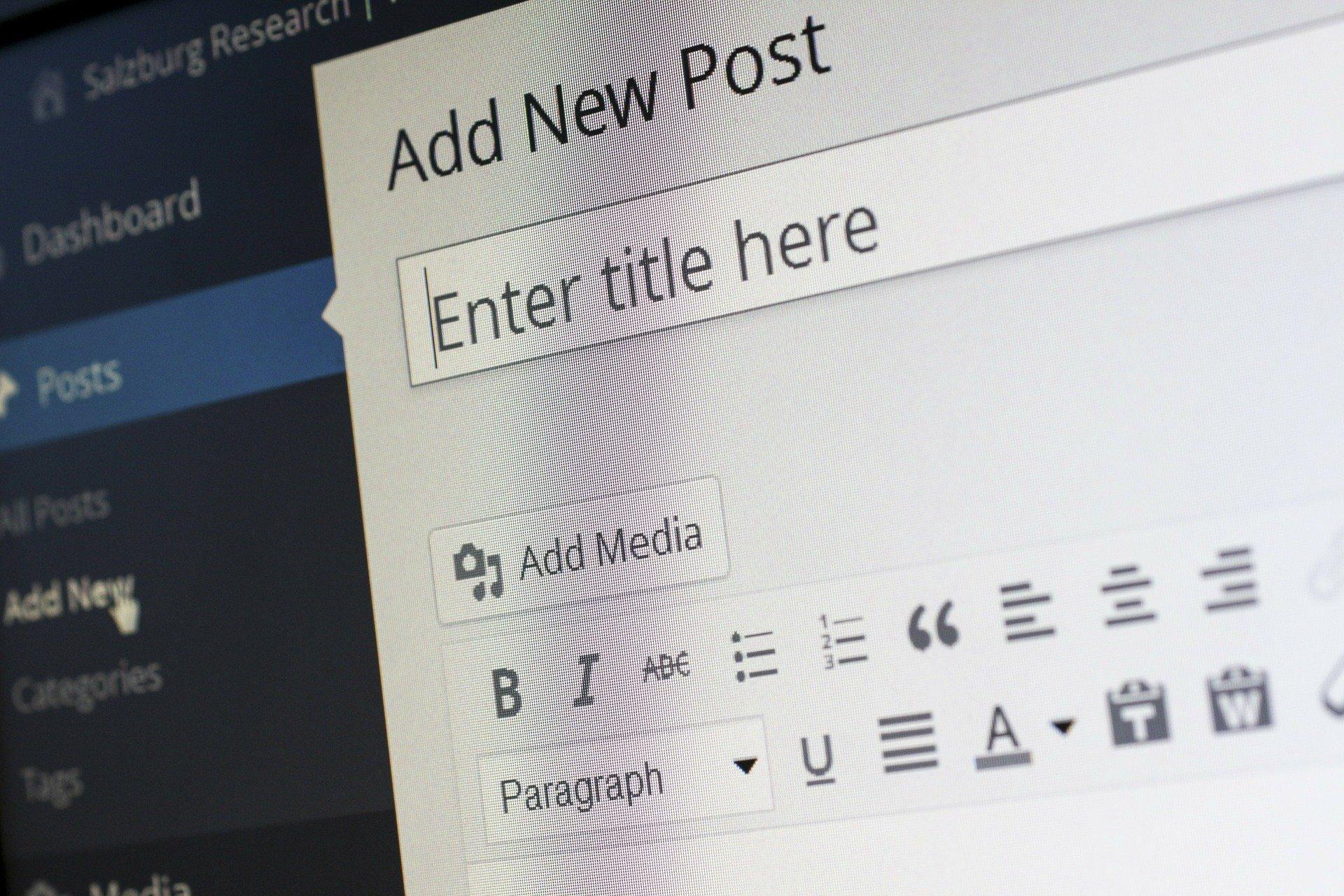
WordPress was born as a blogging platform. It’s had its competitors, but nothing currently compares to the power, elegance, and advanced tools you find in the WordPress blogging engine. Options like Tumblr, Medium, Ghost, and Blogger are all perfectly fine for hobbyists, but the pros go for WordPress. An incredible set of tools is located inside the WordPress blog editor.
You can run a simple, one-author blog by taking advantage of the formatting and media tools. There’s also the option to build a full online magazine by scheduling posts far in advanced and setting multiple user types for contributors and editors. Along with options for previewing, editing everything in the post, and keeping code completely out of the equation, you really can’t beat WordPress.
10. The Most POPULAR Content Management system in the business.
So jump off the bridge with them! Okay, just because every else is doing something isn’t always the greatest reason to follow along. But WordPress has proven itself time and again, so the word has gotten out about its performance, expandability, and ease-of-use. There’s a reason why over 455 million sites use WordPress.